
微信读书同步
微信读书同步会把账号中的书架、划线、想法、书评和阅读统计读取到插件中,并把笔记写入对应的思源文档。同步完成后,插件还会建立历史批注索引,后续可以在“同步后处理”教程中查看。普通书籍和公众号使用不同模板,但授权和同步入口相同。
当前版本使用微信读书官方 Skills API Key,不再依赖旧 Cookie。API Key 会加密保存在插件本地数据中,不会以明文写入设置文件。
第一步:申请并验证 API Key
打开微信读书 Skills 页面申请 API Key,也可以在微信读书 App 的相关设置中进入申请页面。
 weread.qq.com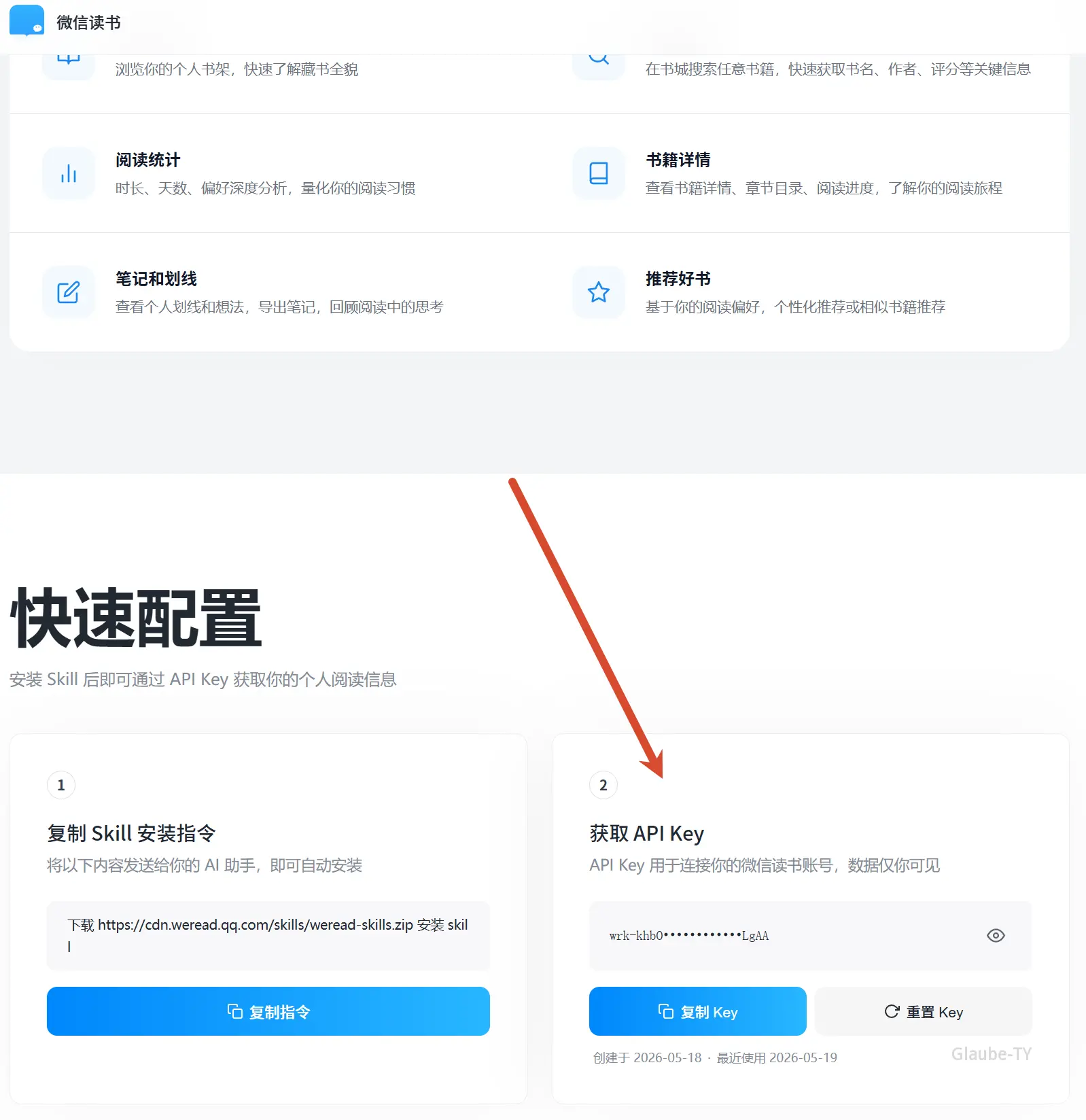
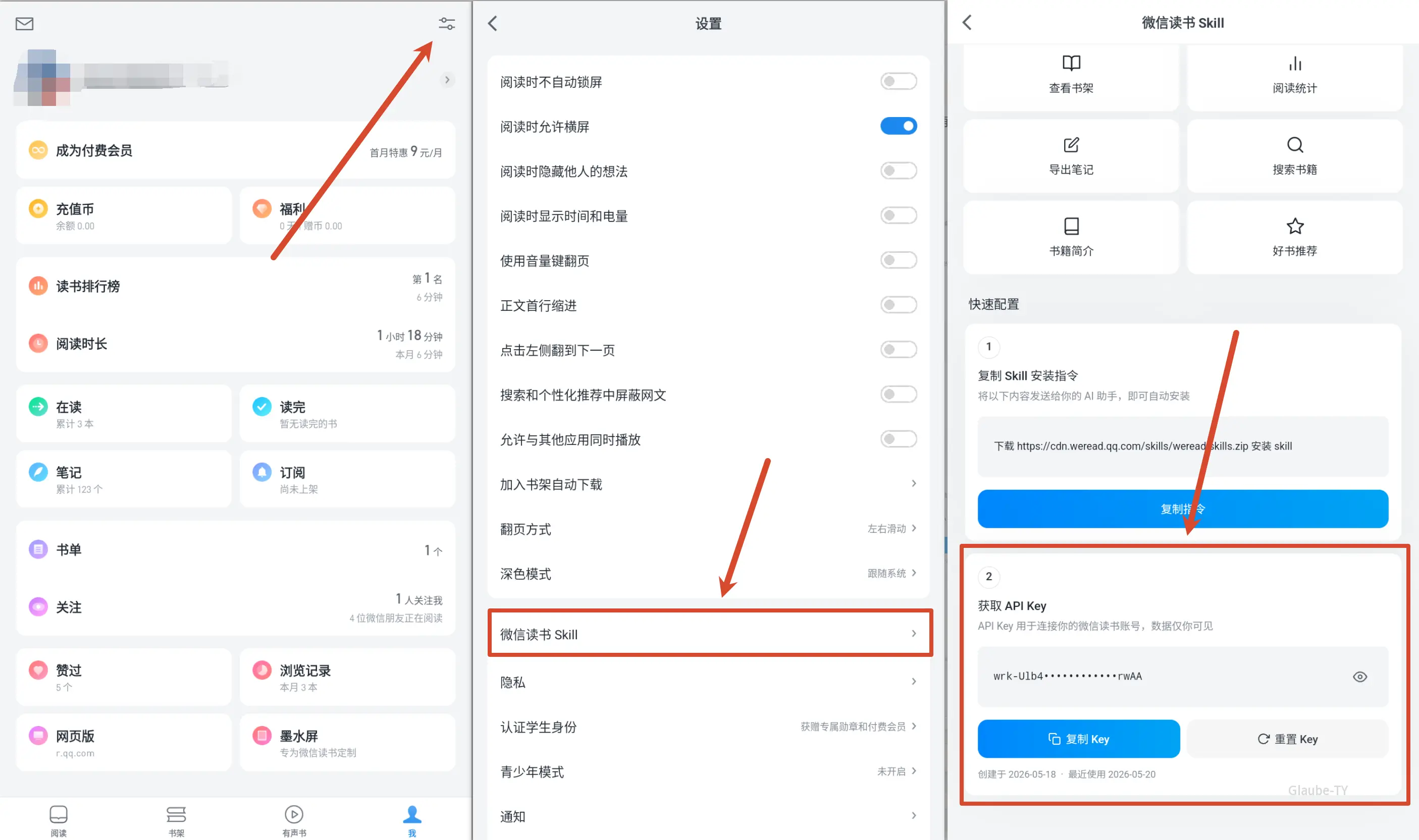
回到阅读工作台,点击“微信授权”,粘贴 API Key 并验证。只有验证通过后,书架、阅读统计和同步按钮才能读取账号数据。
API Key 可以访问你的微信读书数据。截图、反馈或录屏时请遮住它;怀疑泄露时,应在微信读书侧重新生成并在插件中更新。
第二步:设置同步模板
在工作台点击“模板”,分别设置“微信读书书籍模板”和“微信公众号模板”。两套模板互不覆盖:普通图书按章节整理划线与想法,公众号模板按文章整理笔记。
微信读书模板使用成对的条件块和循环块。以 {{#bookInfo}} 开始,就必须用 {{/bookInfo}} 结束;开始与结束名称也要完全相同。
{{#chapters}}、{{#notes}}、{{/notes}} 这类结构标记建议单独占一行,不要在前面添加无意义的空格。模板中的缩进应只用于你希望最终生成的列表层级。
普通书籍完整模板
下面是可直接使用的完整模板。它会显示书名、简介、热门划线、全书书评,并按章节整理划线与评论。
# {{notebookTitle}}
**最后同步时间**:{{updateTime7}}
**微信读书 BookID**:{{bookID}}
**微信读书**:[打开阅读]({{wereadDeepLink}})

{{#bookInfo}}
## 书籍简介
> {{bookInfo}}
{{/bookInfo}}

## 热门划线
{{#bestHighlights}}
> {{bestHighlight}}
{{/bestHighlights}}

{{#globalComments}}
## 书评
> {{globalComments}}
- {{createTime7}}
{{/globalComments}}

{{#chapters}}

{{#chapterTitle}}
## {{chapterTitle1}}
### {{chapterTitle2}}
#### {{chapterTitle3}}
##### {{chapterTitle4}}
{{/chapterTitle}}

{{#chapterComments}}
### 章节思考
> {{chapterComments}}
- {{createTime7}}
{{/chapterComments}}

{{#notes}}

{{#highlightText}}
- {{highlightText}}
{{/highlightText}}

{{#highlightCreateTime7}}
  - 标注时间:{{highlightCreateTime7}}
{{/highlightCreateTime7}}

{{#comments}}
  - 评论:{{content}}
  {{#commentCreateTime7}}
    - 评论时间:{{commentCreateTime7}}
  {{/commentCreateTime7}}
{{/comments}}

{{/notes}}

{{/chapters}}
书籍模板字段说明
全书信息
| 变量或区块 | 作用 |
|---|---|
{{notebookTitle}} | 书名 |
{{bookID}} | 当前普通书籍的真实微信读书 bookID |
{{wereadDeepLink}} | 微信读书 /book/info 返回的官方跳转链接;没有返回时为空,不会自动补链接 |
{{updateTime}}、{{updateTime1}} 至 {{updateTime10}} | 最后一次标注或评论的时间,可选择不同显示格式 |
{{#bookInfo}}...{{/bookInfo}} | 书籍简介条件块,内部使用 {{bookInfo}} |
{{#bestHighlights}}...{{/bestHighlights}} | 热门划线循环,内部使用 {{bestHighlight}} |
{{#globalComments}}...{{/globalComments}} | 全书书评循环,内部使用 {{globalComments}} 和 {{createTimeX}} |
旧模板中的 {{AISummary}} 不再可用。当前版本使用微信读书官方 Skills 接口,而该接口不返回这项数据,所以模板中应直接删除它。
章节与笔记
所有章节内容都放在 {{#chapters}}...{{/chapters}} 中。每次循环代表一章,内部可以继续使用以下区块:
| 变量或区块 | 作用 |
|---|---|
{{#chapterTitle}}...{{/chapterTitle}} | 章节标题区块 |
{{chapterTitle1}} 至 {{chapterTitle4}} | 最多四级章节标题,没有对应层级时为空 |
{{#chapterComments}}...{{/chapterComments}} | 章节级想法,内部使用 {{chapterComments}} 与 {{createTimeX}} |
{{#notes}}...{{/notes}} | 当前章节的全部笔记循环 |
{{highlightText}} | 当前笔记的划线内容 |
{{highlightCreateTimeX}} | 划线创建时间 |
{{#comments}}...{{/comments}} | 当前笔记下的多条评论循环 |
{{content}} | comments 循环内的一条评论内容 |
{{commentCreateTimeX}} | 评论创建时间 |
划线时间和评论时间是分开的:划线使用 highlightCreateTimeX,评论使用 commentCreateTimeX。只有评论、没有划线的笔记也能进入 notes 循环。
{{bookID}} 和 {{wereadDeepLink}} 是普通书籍模板专用的全书变量。它们会在同步生成普通书籍内容时先替换;wereadDeepLink 原样使用微信读书 /book/info 返回的 deepLink,如果接口没有返回就替换为空。插件不会自己拼接 weread://,也不会用裸 bookID 猜 Web Reader URL。
旧变量 {{highlightComment}} 仍为兼容保留,但一条划线有多条评论时,推荐使用 {{#comments}}...{{/comments}},否则无法完整表现评论列表。
时间格式
变量末尾的数字只控制时间的显示方式,不会改变同步数据。updateTime 的无数字写法是旧版默认格式,与 updateTime6 接近。
| updateTime 变量 | 输出示例 | 说明 |
|---|---|---|
{{updateTime}} | 2026/3/29 22:27:00 | 旧版默认格式 |
{{updateTime1}} | 2026/03/29 22:27 | 斜杠分隔,无秒 |
{{updateTime2}} | 2026-03-29 22:27 | 横线分隔,无秒 |
{{updateTime3}} | 2026.03.29 22:27 | 点号分隔,无秒 |
{{updateTime4}} | 2026年03月29日 22时27分 | 中文单位,无秒,补零 |
{{updateTime5}} | 2026年3月29日 22时27分 | 中文单位,无秒,不补零 |
{{updateTime6}} | 2026/03/29 22:27:00 | 斜杠分隔,带秒 |
{{updateTime7}} | 2026-03-29 22:27:00 | 横线分隔,带秒 |
{{updateTime8}} | 2026.03.29 22:27:00 | 点号分隔,带秒 |
{{updateTime9}} | 2026年03月29日 22时27分00秒 | 中文单位,带秒,补零 |
{{updateTime10}} | 2026年3月29日 22时27分0秒 | 中文单位,带秒,不补零 |
createTimeX、highlightCreateTimeX、commentCreateTimeX、articleCreateTimeX 和 latestArticleTimeX 使用同一组编号规则:
| 编号 | 输出示例 | 说明 |
|---|---|---|
1 | 2026/03/29 22:27 | 斜杠分隔,无秒 |
2 | 2026-03-29 22:27 | 横线分隔,无秒 |
3 | 2026.03.29 22:27 | 点号分隔,无秒 |
4 | 2026年03月29日 22时27分 | 中文单位,无秒,补零 |
5 | 2026年3月29日 22时27分 | 中文单位,无秒,不补零 |
6 | 2026/03/29 22:27:00 | 斜杠分隔,带秒 |
7 | 2026-03-29 22:27:00 | 横线分隔,带秒 |
8 | 2026.03.29 22:27:00 | 点号分隔,带秒 |
9 | 2026年03月29日 22时27分00秒 | 中文单位,带秒,补零 |
10 | 2026年3月29日 22时27分0秒 | 中文单位,带秒,不补零 |
例如,{{createTime2}}、{{highlightCreateTime2}} 和 {{commentCreateTime2}} 都会使用“年-月-日 时:分”的格式。
公众号完整模板
公众号会按文章组织内容,不能直接套用普通书籍的章节模板。下面的模板默认让最新文章排在前面。
# {{accountTitle}}
{{#accountCover}}

{{/accountCover}}
{{#accountIntro}}
> {{accountIntro}}
{{/accountIntro}}
- 共收录 **{{articleCount}}** 篇文章
{{#updateTime7}}- 最近同步时间:{{updateTime7}}{{/updateTime7}}
{{#latestArticleTitle}}- 最新文章:**{{latestArticleTitle}}**{{/latestArticleTitle}}
{{#latestArticleTime7}}- 最新发布时间:{{latestArticleTime7}}{{/latestArticleTime7}}
---
{{#articlesDesc}}
## {{articleTitle}}
- 笔记数:{{noteCount}}
{{#articleCreateTime7}}- 发布时间:{{articleCreateTime7}}{{/articleCreateTime7}}
{{#updateTime7}}- 更新时间:{{updateTime7}}{{/updateTime7}}
{{#notes}}
### 笔记
{{#highlightText}}
> {{highlightText}}
{{/highlightText}}
{{#highlightComment}}
{{highlightComment}}
{{/highlightComment}}
{{#highlightCreateTime7}}- 划线时间:{{highlightCreateTime7}}{{/highlightCreateTime7}}
{{#commentCreateTime7}}- 评论时间:{{commentCreateTime7}}{{/commentCreateTime7}}
{{/notes}}
---
{{/articlesDesc}}公众号模板字段说明
| 变量或区块 | 作用 |
|---|---|
{{accountTitle}} | 公众号名称 |
{{accountCover}} | 公众号封面图片地址,需要放在 Markdown 图片语法中 |
{{accountIntro}} | 公众号简介 |
{{articleCount}} | 有笔记的文章数量 |
{{updateTimeX}} | 公众号或文章的最近同步时间,具体含义取决于所在作用域 |
{{latestArticleTitle}} | 最近做过笔记的文章标题 |
{{latestArticleTimeX}} | 最近一篇文章的发布时间 |
{{#articlesDesc}}...{{/articlesDesc}} | 文章倒序循环,新文章在前 |
{{#articlesAsc}}...{{/articlesAsc}} | 文章正序循环,旧文章在前;与 articlesDesc 二选一 |
{{articleTitle}} | 当前文章标题 |
{{noteCount}} | 当前文章笔记数 |
{{articleCreateTimeX}} | 当前文章发布时间 |
{{#notes}}...{{/notes}} | 当前文章的笔记循环 |
{{highlightText}} | 划线内容 |
{{highlightComment}} | 对应评论内容 |
公众号模板不提供 {{bookID}} 和 {{wereadDeepLink}}。这两个变量只属于“微信读书书籍模板”,不要复制到公众号模板中;公众号模板应使用上表中的账号、文章和笔记变量。
同步普通书籍时不会使用公众号模板;同步公众号时也不会套用普通书籍模板。因此,两套模板可以分别设计,不必保持相同结构。
第三步:设置同步位置
“位置标记”用于确定微信读书内容写入文档的位置。插件会保留标记之前的内容,并在标记之后更新同步区域。
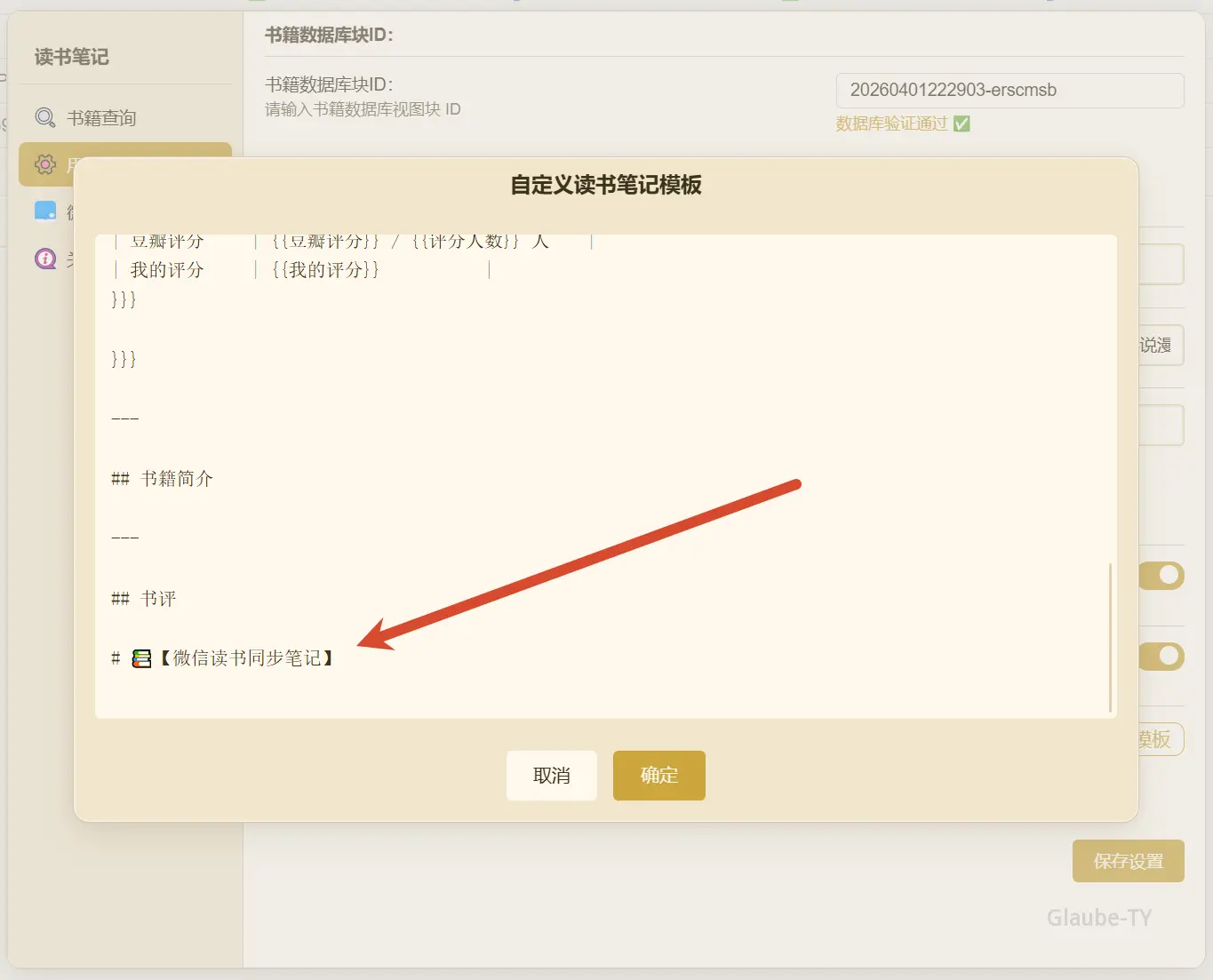
建议把位置标记直接写入基础书籍模板。以后新建的读书笔记会自动带上标记,首次同步时不必再手工补充。
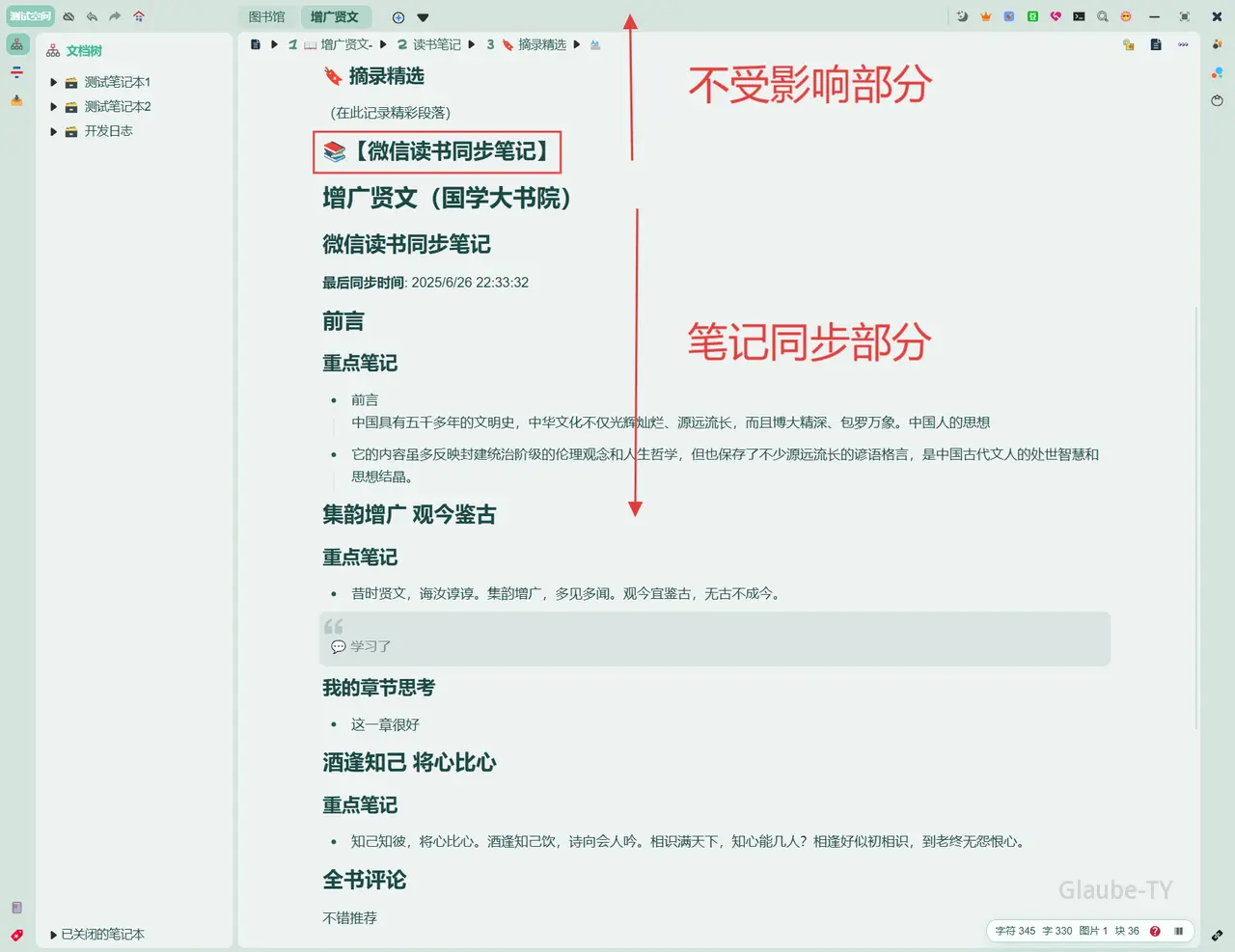
同一篇文档中不要重复使用完全相同的位置标记。若文档中找不到标记,当前版本会在文档末尾补上;为了让同步位置稳定,仍建议提前写进基础模板。
第四步:开始同步
模板和位置标记设置完成后,可以根据实际情况选择同步方式:
| 同步方式 | 工作方式 | 建议用法 |
|---|---|---|
| 更新同步 | 检查微信读书缓存更新时间、笔记/评论数量签名、同步块索引、模板 hash 和强制同步来源等条件,细粒度处理有变化的来源 | 日常首选;处理新增内容、数据变化、模板变化或索引需要修复的来源 |
| 全部同步 | 不依赖普通“是否发生变化”的筛选,把全部已建立关联、可同步的来源纳入本次检查和同步计划;仍按当前细粒度规则处理同步单元 | 强制检查全部已关联来源,适合希望重新核查全部来源、补全历史索引或排查同步结构问题时使用 |
| 自动同步 | 只对当前设备生效;每次打开思源笔记时,本次会话最多执行一次更新同步 | 希望打开软件后自动维护笔记时开启 |
“全部同步”不等于删除后重新生成整个同步区域。普通书籍和公众号同步都采用细粒度同步:同步索引有效时,会比较各个受管理同步单元,只处理新增、修改或删除的内容;索引不存在、失效或与文档结构不一致时,才可能重建位置标记之后的插件管理区域。
现在的自动同步是“本设备自动同步”,设置只保存在当前设备,不会同步到其他设备。若思源数据同步已启用,插件会等思源同步完成后再执行;若思源为完全手动同步模式,会弹窗询问是否等待思源同步。为避免快照冲突,优先选择“等待思源同步”,并建议只在一个常用设备开启自动同步。
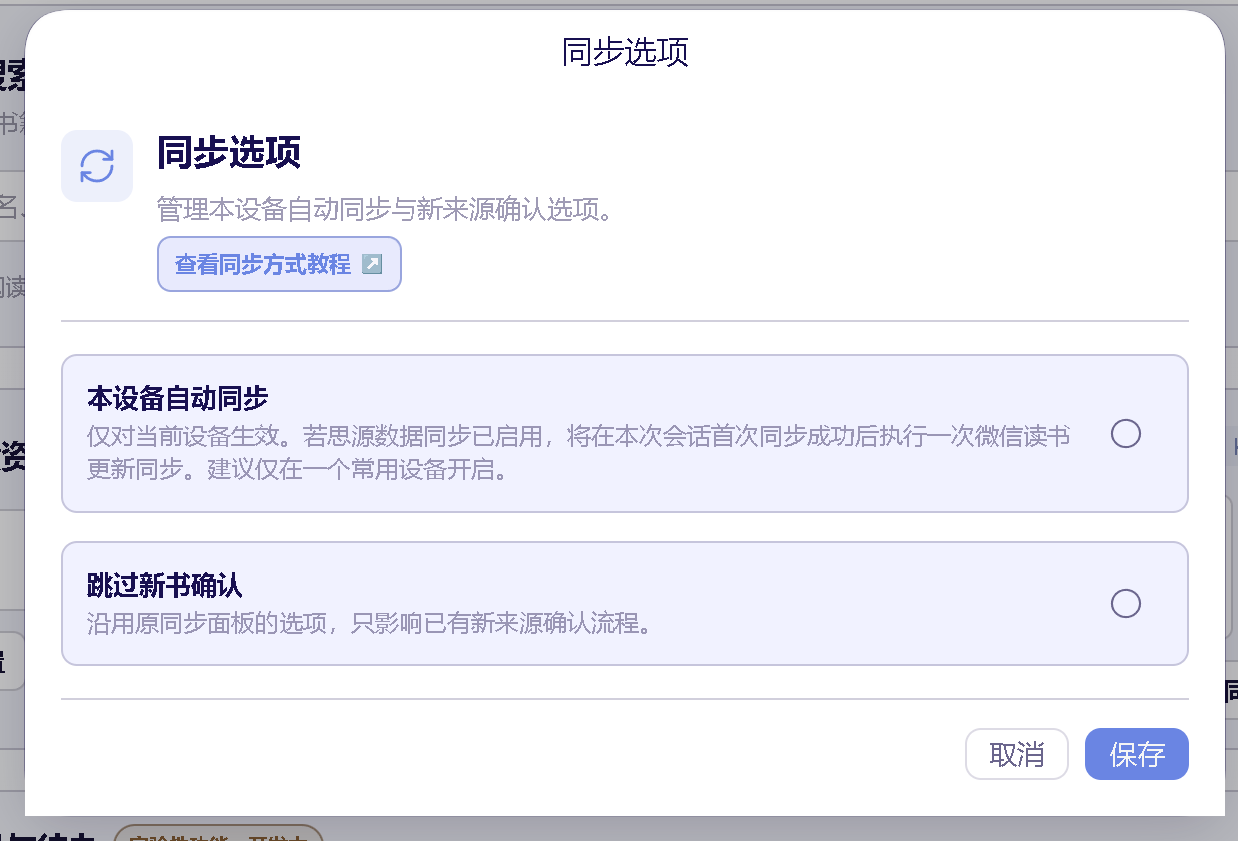
无论更新同步还是全部同步,用户自己的长期笔记都应放在位置标记之前。正常情况下同步会优先采用细粒度更新;当同步索引不存在或损坏时,插件可能重建标记之后的受管理区域,因此不要把需要长期保留的人工内容放到插件管理区域中。
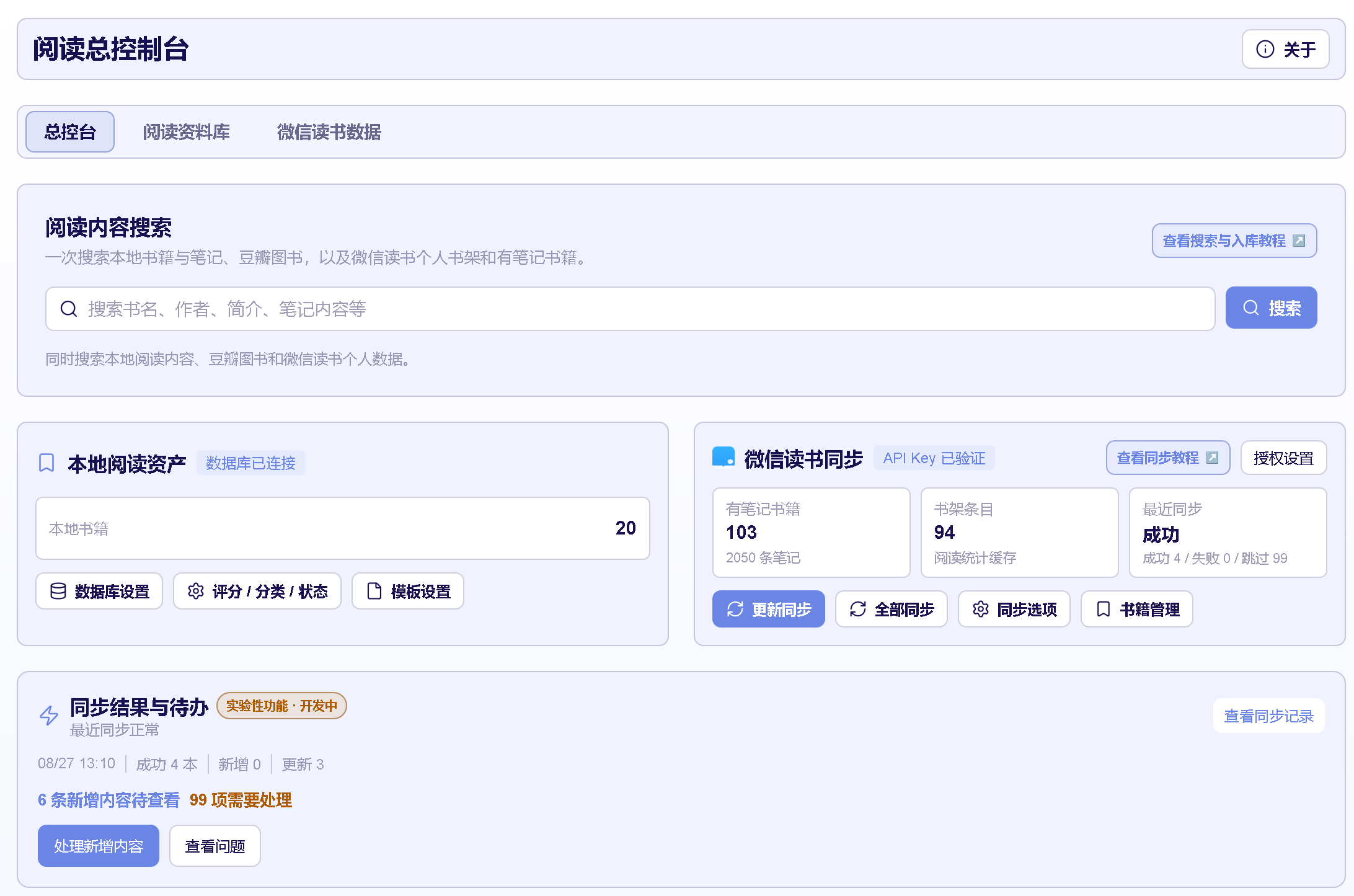
同步设置中还可以开启“跳过新书检查”。开启后,不再弹出新来源确认,只同步已经建立关联的书籍和公众号。它适合暂时不想处理新书、但又不想把它们永久设为忽略的情况。
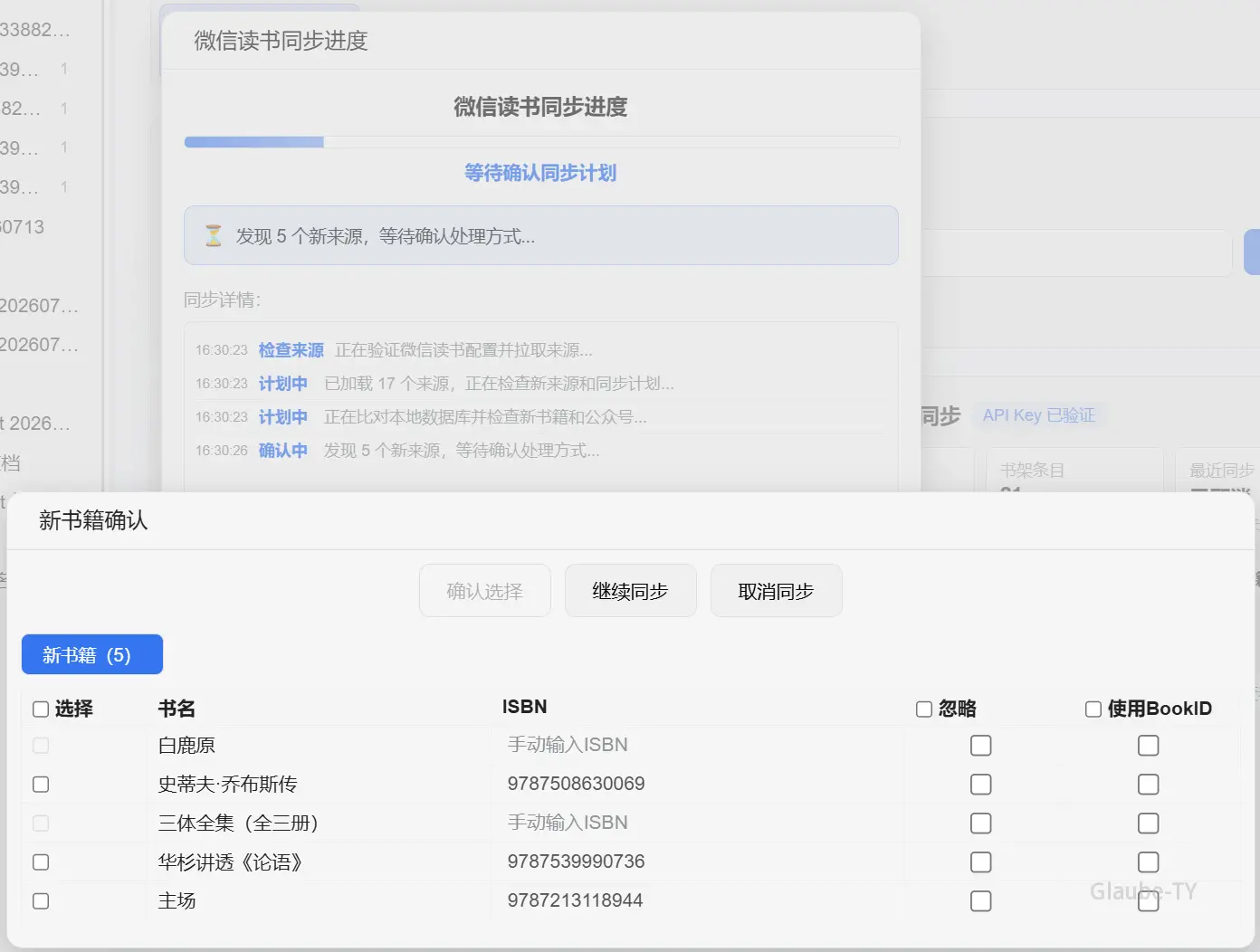
第一次遇到尚未进入本地数据库的书籍时,插件会打开新来源确认窗口:
| 选择 | 适合情况 |
|---|---|
| 使用 ISBN | 通过豆瓣补全较完整的图书元数据;书籍必须有可用 ISBN |
| 使用 bookID | 没有 ISBN,或不需要豆瓣匹配时,直接使用微信读书数据入库 |
| 忽略 | 记录为忽略,当前和后续同步都跳过这本书 |
选择“使用 bookID”时,插件会直接按微信读书的 bookID 获取书籍信息并写入书籍数据库,不经过 ISBN 匹配。书籍简介来自 /book/info 的 intro;如果接口没有可靠的作者介绍,作者介绍 可以为空。此时仍会使用“书籍笔记模板”创建新文档,后续微信读书划线、想法和书评则使用“微信读书书籍模板”填充同步区域。
“书籍笔记模板”负责新建文档的初始结构;“微信读书书籍模板”负责普通书籍同步内容。两者不是同一份模板,不能因为修改了前者就期待已有同步区域立即变化。
确认窗口底部的两个按钮作用不同:
| 按钮 | 实际效果 |
|---|---|
| 确认选择 | 保存当前对新书所选的 ISBN、bookID 或忽略方式,然后继续同步已有内容 |
| 继续同步 | 暂时略过窗口中的全部新书,只同步已经关联的内容 |
只点击“继续同步”不会把新书加入数据库,也不会保存当前选择。希望新书真正入库时,必须点击“确认选择”。
修改模板后让已有书籍应用新模板
保存“微信读书书籍模板”后,执行一次“更新同步”。插件会检测模板变化并重新处理已有普通书籍的受管理同步区域,即使这次没有新增批注,也会应用新的模板。这个过程不会删除、重新导入或重新创建整篇文档;位置标记之前的个人内容仍由你自己维护。
下一步:同步后处理
同步结束后,前往“同步后处理”教程查看同步结果与待办,浏览阅读资料库、历史批注、主题和微信读书数据。
常见问题
API Key 验证失败
重新复制完整的 API Key,检查前后是否带有空格,并确认微信读书 Skills 页面仍显示该密钥有效。重新生成密钥后,也要回到插件中重新验证。
新书一直没有进入数据库
检查是否开启了“跳过新书检查”,以及新来源窗口中是否选择了“确认选择”。使用 ISBN 时还要确认该书确实有有效 ISBN;没有时改用 bookID。
自动同步没有立即开始
先检查“同步选项”中的“本设备自动同步”是否开启,并确认 API Key 和微信读书模板已经配置。若思源正在同步,插件会等待;若思源使用完全手动同步,请先完成一次思源数据同步,或在确认窗口中选择继续。
自己写的内容被同步区域覆盖
检查位置标记是否唯一,并把个人内容放在标记之前。不要手工编辑标记之后由插件维护的同步内容。
只有部分内容没有显示
优先检查模板中的条件块和循环块是否成对闭合。若问题仍然存在,打开“同步诊断”,记录失败项目后再调整对应模板。